

AI Video Generator Comparison: What to Check Before You Pay
Compare AI video generator previews, credits, resolution, duration, audio and exports before paying. Use a beginner checklist and check tool details.
Tool Guides
Before paying for an AI video generator, confirm what you can download, which settings the quoted price covers, and how many attempts your purchase allows. A free preview is not necessarily a free full video, and a credit balance does not tell you how many finished clips you can make until you know the cost of your settings.
This AI video generator comparison checklist helps you compare offers on the same terms. Start with the tool directory, open a relevant detail page, then check the provider's current price before buying. AI Trending Video helps you research the options; generation and any purchase happen on the third-party provider's website.
1. Free previews, welcome credits and free full videos are different
A free preview shows a sample
A preview might be a still image, a short moving clip or a reduced-quality version. Ask what it lets you evaluate: the likeness of a face, the framing, the opening movement, or the complete sequence. Check whether you can download it and whether it contains a watermark.
A short preview cannot prove that a longer sequence will keep identities consistent through every cut. Use it as evidence about the part you can inspect, then decide whether that is enough to justify a paid attempt.
Welcome credits are an allowance
Welcome credits are a balance you can spend under the provider's rules. They might cover only a preview or limited settings. Compare the cost of your intended generation with the available balance, and check eligibility, expiration and whether failed attempts return credits. Credit units are specific to each service; 100 credits on one site are not equivalent to 100 on another.
A free full video is a complete output
An offer for a free full video should specify the length, quality and download conditions. Confirm whether “free” includes the export you need, rather than just viewing the result. Check limits on watermarks, resolution, audio and allowed use before treating it as a substitute for a paid option.
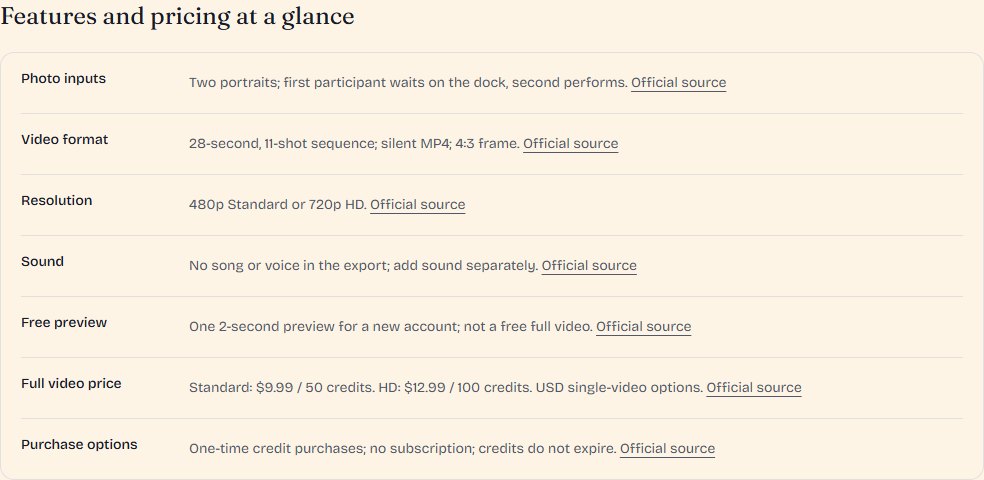
For a concrete example, RainDance AI's pricing page lists a free two-second preview for new accounts and paid 28-second full videos. Those are different deliverables. Use our RainDance AI tool details to understand the workflow, then verify the current offer on the official page.
2. Compare the cost of resolution, duration and dimensions
Use the same output requirements for each quote
Write down the deliverable first: for example, one 10-second portrait clip, with the required sound, at a resolution suitable for your post. Then check whether each service can provide that output and what it costs. A lower starting price may describe a shorter clip, a different quality level or a different workflow.
Keep these three settings separate:
- Resolution: the detail level, such as 480p, 720p or 1080p.
- Duration: how long the generated clip or assembled sequence runs.
- Aspect ratio and dimensions: the shape and pixel size of the export, such as portrait 9:16 or landscape 16:9.
Higher resolution or a longer generation can change the credit cost, but the relationship is provider-specific. Do not assume that doubling the duration doubles the price, or that changing orientation always costs extra.
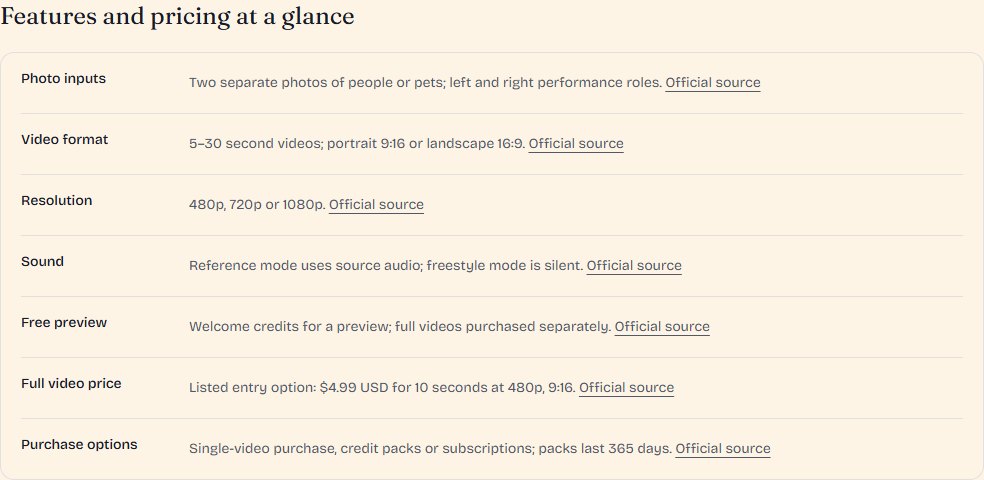
For example, Hotel Lobby AI's published credit table lists 11 credits for 10 seconds at 480p and 17 for 10 seconds at 720p. It states that portrait and landscape use the same credits. Its $4.99 single-video option describes 10 seconds at 480p in 9:16. These are provider-reported examples checked on October 29, 2026; confirm your settings and total on the generator before paying. The Hotel Lobby AI detail page provides a starting point for that check.
Budget for attempts and the purchase you actually need
A technically successful generation may still need another attempt because a face, gesture or transition is unsuitable. Distinguish a failed render from an output you simply do not want to use, and check how the provider charges for each.
Use this planning calculation: credits per attempt × planned attempts = generation budget. If an imaginary tool charges 20 credits per attempt, three attempts need 60 credits. That is a budgeting example, not a quote or a guarantee of three usable clips.
Next, compare that budget with the available packs or subscription. Include the upfront purchase, unused balance, expiration, renewal and any separately charged export or upscale. An advertised per-video average may assume you use an entire pack under particular settings.
3. Check audio, reference images and export restrictions
Audio: what is included in this mode?
Check whether the result is silent, includes a reference soundtrack, generates speech, or supports lip sync. These features are not interchangeable. A video that appears to show a performance does not by itself establish what sound the download contains.
For instance, RainDance AI's official pricing page describes silent 4:3 MP4 output. Hotel Lobby AI's official pricing page distinguishes source-audio and silent output. Check the selected mode rather than assuming that every export includes music. If you plan to add sound later, include that editing step in your workflow.
References: can the tool use your actual material?
Confirm the number of photos, supported file types, minimum image dimensions and whether subjects must be supplied separately. Ask whether a tool accepts pets, a shared photo or a custom reference clip only if your idea needs those inputs. A prepared reference performance does not necessarily mean you can upload arbitrary video footage.
Export: can you use the finished file?
Verify the file type, resolution, aspect ratio, watermark rules and download access for your purchase. If your next step is editing in another application, check that it accepts the exported format. If you need a transparent background, an editable project or separate audio tracks, look for explicit support; do not infer it from a generic “HD download” label.
4. Verify fees and features on a tool detail page
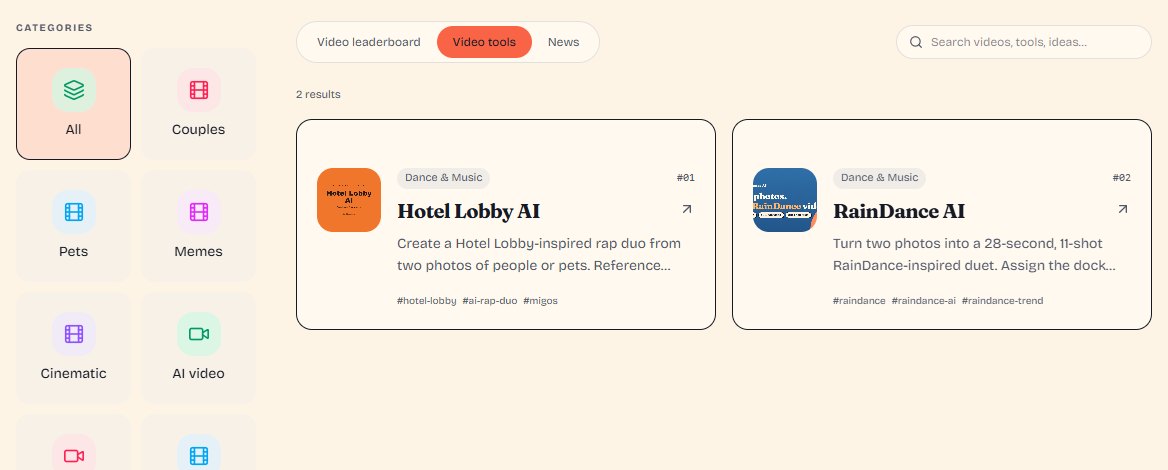
Use the AI video tool directory to build a shortlist, then open each tool's details. Where a curated guide is available, its specification panel separates the preview, full-video price, output and billing conditions.
Follow this order:
- Confirm the workflow. Does it make the effect you want from the material you have? If needed, read our guide to choosing a generator for a trending effect first.
- Read the specification rows together. A preview price, paid export and optional subscription may describe different products.
- Read limitations and the checked date. Public specifications can be reviewed without independently testing likeness, timing or output quality. The guide should make that distinction clear.
- Follow the official-source links. Check the current pricing page and generator settings, including the total shown for your chosen configuration.
- Select Start creating when ready. This opens the provider's website. Confirm the purchase conditions there before proceeding.
If you arrive from a trend detail page, its related tools help identify possible recreation workflows. The recommendation does not establish which software the original creator used, or guarantee identical results. Compare the proposed tool's actual requirements before purchasing.
5. A beginner's checklist before paying
Use these questions as a final purchase check:
- Can I supply the required inputs? Confirm photo count, dimensions, file types and permission to use the material.
- What does the free offer include? Identify whether it is a preview, credit allowance or full downloadable video.
- What settings does the quoted price cover? Record duration, resolution, aspect ratio and audio mode.
- How many attempts can I afford? Check retry charges and the distinction between render failure and an unwanted result.
- What must I buy upfront? Confirm the pack or subscription total, credit expiration and automatic renewal conditions.
- What can I export? Verify file type, watermark, download availability and any extra export or upscale fee.
- What work remains? Allow for cropping, editing or adding sound if the tool does not deliver your finished format.
- Have I checked the current provider information? Review the selected settings and purchase terms rather than relying only on an older screenshot or starting price.
For a first purchase, choose a tool whose inputs you can prepare and whose output fits your project, then evaluate the smallest suitable option available. A larger pack is only useful if you expect to use it under its actual conditions.
Start with the RainDance AI preview and full-video guide or the Hotel Lobby AI features and pricing guide. To explore other workflows, return to the AI video generator directory.