

Hotel Lobby AI Meme Explained: The Two-Character Video Trend
Explore the Hotel Lobby AI meme: its orange stage, two characters and hanging microphone. Find video examples, prompt ideas and tools for your own duo.
Video Trends
The Hotel Lobby AI meme reimagines a two-person music performance with a different cast: friends, a couple, fictional characters or pets. Its recognizable look combines a warm orange studio, two performers and a hanging microphone. The joke often comes from seeing an unexpected pair act like a serious rap duo.
Start with our Hotel Lobby meme video detail page to explore an example, read the effect guide and find a sample prompt and related tools. This article explains what to look for before planning your version.
What is the Hotel Lobby video effect?
The visual reference comes from Quavo and Takeoff's performance of “HOTEL LOBBY” for A COLORS SHOW. You can watch the original A COLORS SHOW performance or open our original-source video reference. That source is a music performance; it should be distinguished from later AI remakes and fan edits.
In a remake, the cast changes while enough of the stage arrangement remains to make the reference clear. A familiar character, an unlikely friendship or two pets can take the place of the performers. “Hotel Lobby” describes this performance reference here, rather than a tour of a hotel interior.
The name does not identify a single production method. One clip may come from a prepared photo-to-video workflow; another may combine generated shots with editing. Seeing the trend name in a caption does not establish which generator was used.
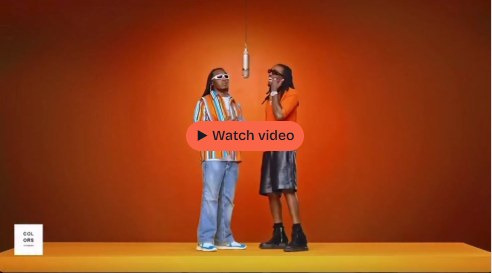
The three visual cues that make it recognizable
An orange background with very little distraction
The warm, largely monochromatic set gives the performers room to stand out. A busy room, crowd or collection of props can weaken that visual reference. If you are writing a prompt, describe a simple orange studio and keep the background consistent across the shot.
The color helps establish the look, but it is not the whole effect. Two unrelated characters against an orange wall will not necessarily read as a shared performance. Their placement and interaction also matter.
Two distinct characters sharing the frame
The pairing is central to the meme. Both subjects need enough space to remain visible, with clear left and right positions. Clothing, silhouette or other visual differences help viewers tell them apart.
For your own version, decide who stands on each side before uploading references. Begin with small head nods or restrained gestures. That makes it easier to inspect whether identities and outfits remain stable before attempting more elaborate movement.
A microphone between the performers
The suspended microphone connects the two subjects and makes the scene read as a performance. Check its position in the preview: it should remain recognizable and avoid covering either face. A microphone that changes shape, duplicates or moves through a subject can disrupt the scene.
Framing matters here. If you crop a wider clip into portrait, check that both characters and the microphone still fit. A close-up of one face may lose the shared-stage composition that makes the reference work.
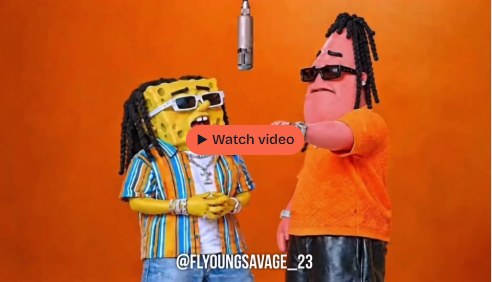
People, couples and pets: what changes?
Friends or other human pairings
With two people, the main checks are recognizable faces, distinct identities and believable movement. Use clear references and keep the role assignments consistent. If the tool requests one photo per participant, provide those separate inputs rather than assuming a group photo will work.
Couples
A couple's version changes the casting and the idea behind the post. It does not necessarily require a separate technical mode from a friends' version. You might choose coordinated outfits or a playful exchange of gestures, while retaining the same two-person composition.
Keep both partners equally legible. A good-looking frame of one subject is not enough if the other face changes or disappears during the clip.
Pets
A pet pairing adds a different visual contrast: animals placed in a human-style performance scene. Check that the selected tool explicitly supports pet references. Prepare images with clear faces or muzzles, and inspect ears, paws, body proportions and subject separation in the result.
Treat a pet version as an adaptation, not a promise of human-like lip sync or perfect choreography. If your first test mixes the subjects or produces confusing movement, simplify the action and references before trying again.
How to find a template, prompt or supporting tool
1. Start from the video detail page
Open the Hotel Lobby AI meme guide. Watch the linked example where available, then read the effect explanation, suggested steps and sample prompt. If the embedded player does not work, use the original-source link.
For context, compare it with the source-performance reference. The original and the remake answer different questions: what inspired the format, and how someone has reinterpreted it.
2. Decide whether you need a prepared scene or a prompt-led workflow
“Template” can mean several things: an editing preset, a generator's built-in stage or a downloadable project. Do not assume that a page mentioning the Hotel Lobby effect supplies all three.
For a prepared workflow, inspect the Hotel Lobby AI tool guide. Its official website describes a browser-based two-photo experience for people or pets, with built-in stage options. Confirm the current inputs and settings there. You may not need a separate downloadable template if the chosen generator already supplies the scene.
For a prompt-led tool, describe your own cast and the visual structure. This example is an editorial starting point, not the original uploader's prompt:
Place the two supplied subjects in a simple orange studio. Subject A stays on the left and subject B on the right, with one microphone suspended between them. They perform small head nods and restrained gestures toward the shared microphone. Fixed camera, consistent appearance, both subjects visible, no additional people or text.
Adapt the wording to the controls your tool actually provides. A scene prompt alone does not guarantee synchronized vocals, a specific song or an exact recreation of the original performance.
3. Read the tool recommendation and verify the output
On the video detail page, scroll to Recommended recreation tools. Read why a tool appears, then open its detail page to check photo requirements, supported subjects, aspect ratio, sound and preview conditions. A related tool is a possible recreation option; it is not proof that the original creator used it.
For sound, distinguish a mode that follows a reference performance from a silent generation. Hotel Lobby AI's official page describes reference mode with source audio and silent freestyle. Confirm your selected mode before generating, then inspect the actual file before posting.
If you are comparing workflows, read how to choose a generator for a trending effect. Before paying, use the preview, credits and export checklist.
Plan one clear duo before adding complexity
Choose the pair, assign left and right roles, retain the shared microphone and keep the scene simple. Test a short clip and review both subjects, the framing and the sound. Then decide whether more movement or a longer sequence improves the idea.
Next, explore the Hotel Lobby video, prompt and related tools, or watch the source-reference listing to understand the visual starting point.